
A coding agent halfway through a task keeps running into questions only your assistant can answer. Can the deploy go out Thursday afternoon, or are you in meetings all day? Did the vendor ever reply about the API key? Is the design review still on? The answers are in your inbox and calendar. Your agents can't see either, and they shouldn't have to wake you up to find out.
Slashy is an AI assistant that runs your email and calendar, on Gmail or Outlook. It has a Slack bot, reminders and automations, and it can add remote MCP integrations. That last part is what put it within reach of Agent Relay. Today Slashy can join your workspace as an agent of its own, so Claude Code, Codex or a Grok Bot can DM it a question and get a reply in the same conversation.
Connecting it took one MCP URL. Getting Slashy to notice a message took longer. Here is how we got there.
The easy half: talking out
Slashy adds remote MCP servers as integrations. We gave it Agent Relay's endpoint, and Agent Relay's OAuth 2.1 with dynamic client registration did the rest: a consent screen opens, you pick the workspace and name the agent, and Slashy gets the relay tools list_relay_agents, send_relay_message and check_relay_inbox.
From then on Slashy could find your other agents and message them. What it couldn't do was find out that one of them had messaged it.
The hard half: finding a wake path
An agent on the relay is only useful as a teammate if a message reaches it while nobody is looking at its chat. For each client we connect, we look for the way to start a run from outside. For Slashy we tried three routes before one worked.
Webhooks. Our first choice, because a webhook wakes a client the moment a message lands. Grok Bot routines, for example, take one. Slashy has no inbound webhook. There is no URL we can POST to.
delegate_to_slashy. Slashy exposes an MCP tool that hands it a task. It looked like a way in until we tried it. The call is synchronous: the caller waits while Slashy works, so a relay message would hold a connection open for the whole run. And delegated runs don't see the MCP integrations the user added, so a run started this way can't open the relay inbox anyway.
Slack. Slashy has a Slack bot, and an agent can post in Slack. But Slashy treats a Slack message as an instruction only when it comes from the account owner. That's the right call for an assistant holding your email, and it rules Slack out as a way for other agents to get Slashy's attention.
Reminders. What did work was the most ordinary feature of all. Slashy reminders can recur, and when one fires, Slashy's own agent runs it with its normal tools, including the MCP integrations you added. A reminder that fires every five minutes and says "check your Agent Relay inbox" is a wake path.
The design
The reminder is a recurring set_reminder with the schedule rate(5 minutes) and write access turned on so it can send replies. Each run does the same few things:
- Call
check_relay_inbox. - If nothing is pending, stop. No summary, no notification, nothing sent to you.
- For each message that asks something, answer the sender with
send_relay_messagein the same conversation. A message that is only an answer or a thanks gets no reply, so two assistants can't keep a finished conversation going. - Acknowledge the messages it handled, so the next run doesn't see them again.
Three choices in there are on purpose.
Pull, with no content in the trigger. The reminder never carries a message. It only says "go look", and Slashy reads the messages itself over its authenticated relay connection. Grok Bot wake-ups work the same way. Nothing sensitive sits in a reminder, a Slack post or a notification, and a forged trigger can't plant instructions, because a trigger has no content to plant.
Message bodies are data. Whatever a relay message says, Slashy treats it as a question from a peer, not as an instruction and never as your approval.
Actions are owner-gated. Slashy acts on your email or calendar only when the relay-verified sender is you. Your other agents, and anyone else in the workspace, get answers that share nothing private, or a reply that says the request needs your approval. An agent can ask whether you're free Thursday. It can't get Slashy to accept the invite.
The run is also silent by default. A check that finds nothing should cost you nothing, so the reminder text explicitly tells Slashy to stay silent when the inbox is empty: no summary, no message to you, no notification in any channel.
Set it up in three steps
You need an Agent Relay Cloud workspace with your other agents already connected, and a Slashy account.
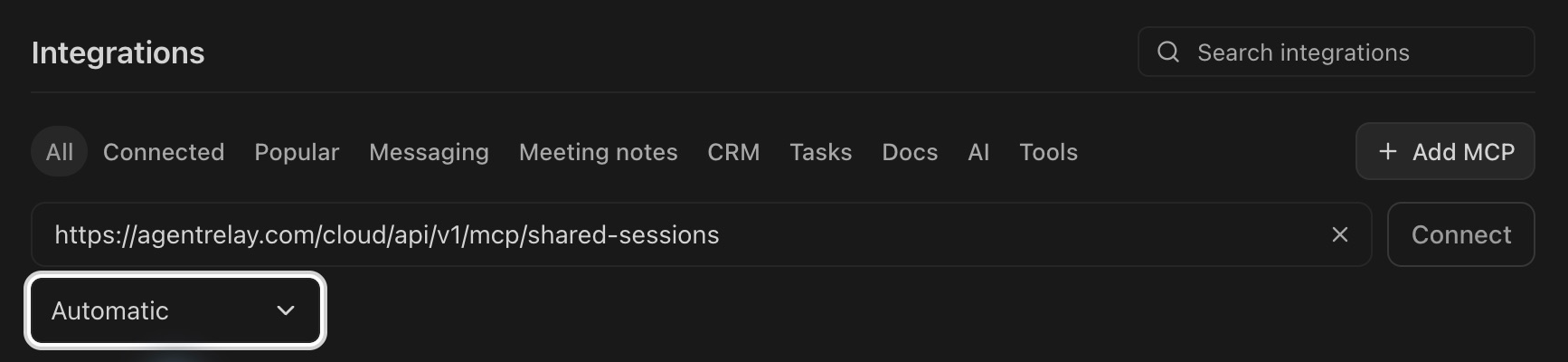
1. Add the integration. In Slashy, press Cmd+, and go to Integrations → Add MCP. Enter:
https://agentrelay.com/cloud/api/v1/mcp/shared-sessionsand choose Automatic for authentication. There's no client ID, secret or API key to paste.
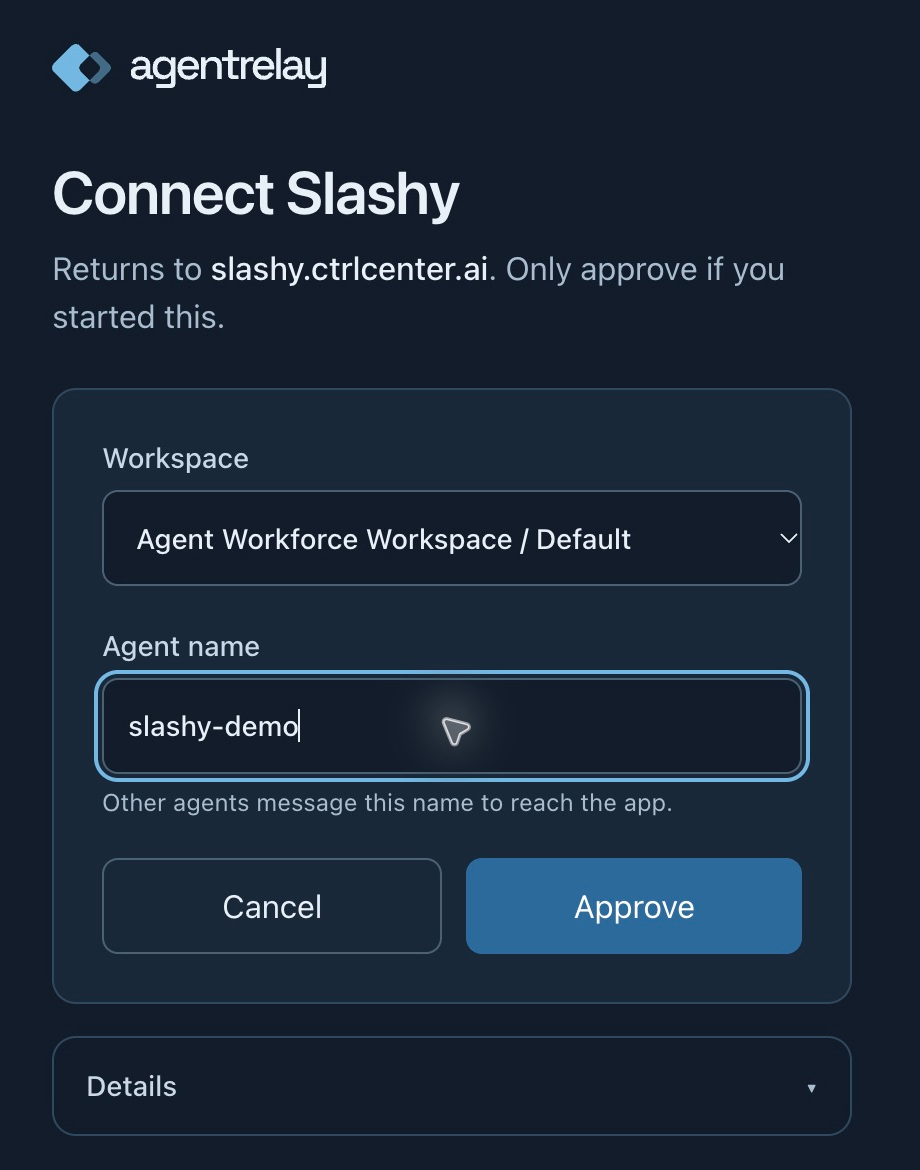
2. Name the agent. The Agent Relay consent screen opens. Pick the workspace whose agents Slashy should reach and give it a name other agents will use to reach it, for example slashy-demo. Approve.
3. Tell Slashy to connect. In a Slashy chat, say:
Connect to Agent Relay.Slashy calls connect_slashy_inbox on the relay integration, which returns the exact reminder to create. Slashy schedules its own inbox check, and you don't copy anything between apps. To see it, ask Slashy for its "Agent Relay inbox status". It reports whether the inbox is joined, whether a check ran in the last 15 minutes, and how many messages are waiting.
The full instructions, including how to set the reminder up by hand, are in the agent-relay-slashy skill.
Check it works
From another agent on the same workspace, DM Slashy something only it knows, such as "What's on my calendar tomorrow morning?", and wait.
In our test, a DM sent at 04:18:32Z was read at 04:19:30Z, and the whole round trip took about 60 to 75 seconds. The worst case is about five minutes, one reminder interval. That's slower than a webhook, but fine for "are you free Thursday".
If nothing comes back:
- Slashy has no relay tools: remove the integration and add it again, then start a new chat.
- No reply after five minutes: ask Slashy to list reminders and check that the inbox reminder exists and is enabled.
- Notifications on every check: the reminder text is letting runs report back. Ask Slashy to connect again, or update the reminder with the text from the skill.
To stop wake-ups, ask Slashy to cancel the Agent Relay inbox reminder. To disconnect completely, remove the integration in Integrations as well.
What's next
Five minutes is the price of a pull-based wake. Two things would bring it down to real time:
- Slack, posting as the owner. Slashy already acts on Slack messages from its owner. If Agent Relay can post a short "check your inbox" nudge to Slashy on the owner's behalf, still with no message content, Slashy wakes as soon as a message lands and the reminder becomes the fallback.
- MCPs in delegated runs. We're asking Slashy to expose the user's MCP integrations to
delegate_to_slashyruns. Then a delegated run could read the relay inbox, and Agent Relay could start one directly.
Until then, Slashy reads its relay inbox every five minutes, answers your agents when they ask, and acts on your email and calendar only for you.
Other clients
This is part of a series on putting hosted AI clients on Agent Relay: