Optional, off by default. Install the standard setup first, from Install on EKS or Install on GKE. The Slack app runs in your cluster, next to it.
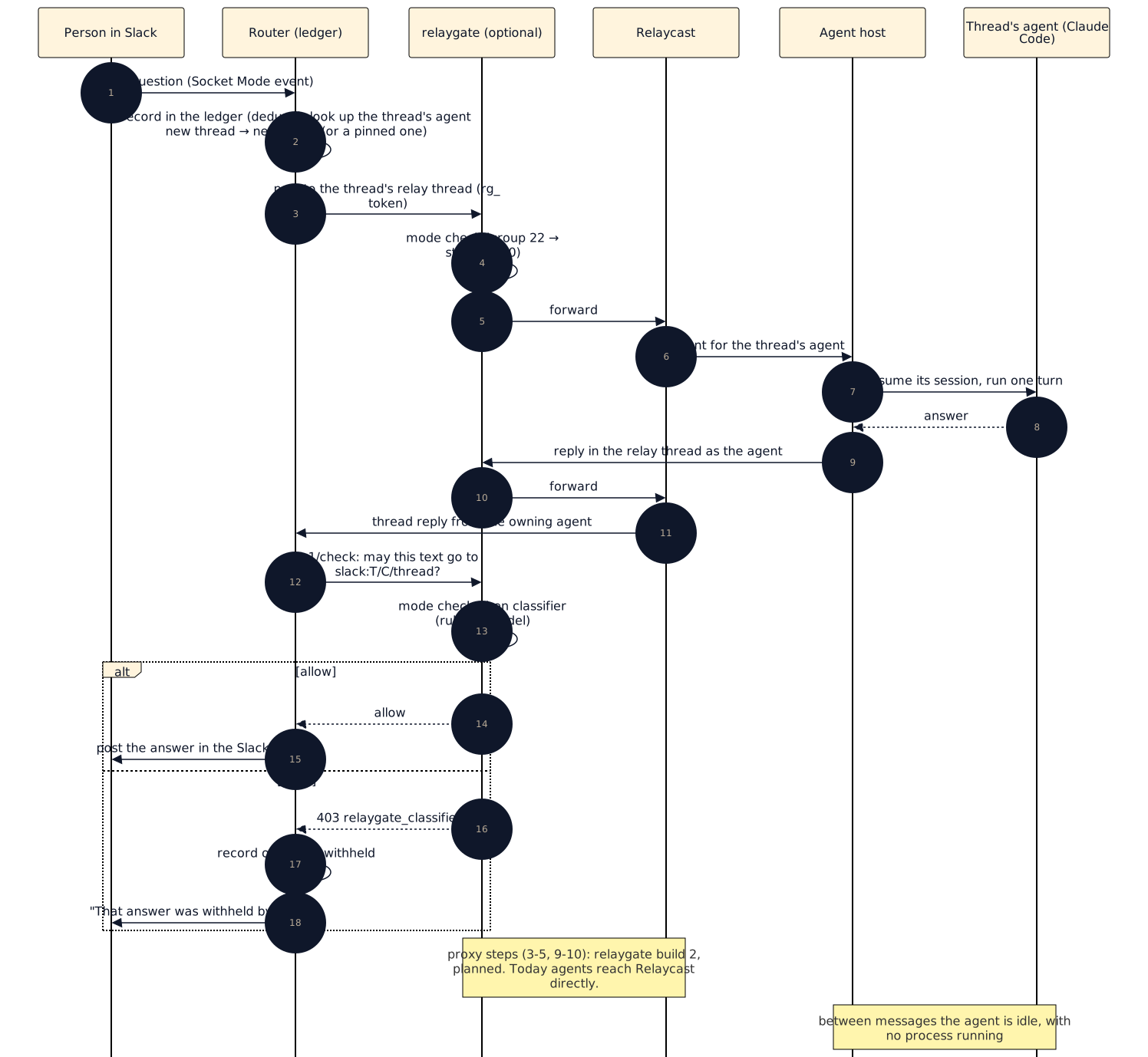
People @mention the app in a channel (or message it directly, if you allow DMs) and an agent picks up the thread. Follow-ups in that thread go to the same agent, with its context, however long the gap; several people can talk in one thread at once. Every agent is on your relay under its own name, so the agents can see and message each other. Nothing about the agents runs between messages: a message wakes the thread's agent, it answers, and it goes idle.

How it works
| Piece | What it does |
|---|---|
| Router | Holds the Slack connection over Socket Mode (an outbound WebSocket; no public URL). Records every message in a ledger: which agent owns each thread, who has spoken in it, and an append-only audit log. It is the only component with Slack credentials. |
| Agent host | Runs one agent per Slack thread as headless Claude Code, with its own resumable session on a volume. It has no Slack credentials. |
| relaygate (optional) | Checks every Slack post and knowledge-base write against your policy, and withholds answers its classifier refuses. It does not yet proxy agents' Relaycast traffic; restrict that with network policy. |
One message, end to end:
Create the Slack app
You create the app in your own Slack workspace; its tokens never leave you.
- Open https://api.slack.com/apps → Create New App → From a manifest,
pick your workspace and paste the
manifest.
To give the app your own name, render it with
render-manifest.py
--name "Your App". - Basic Information → Display Information: upload the app icon. Slack manifests can't carry an icon.
- Basic Information → App-Level Tokens → Generate Token and
Scopes: name it
socket, scopeconnections:write. Leave Token rotation off; the router doesn't refresh app tokens. Copy thexapp-…token. - Install App → Install to Workspace; copy the Bot User OAuth
Token (
xoxb-…). - Invite the app to the channel it should answer in (
/invite @Your App) and note the channel ID (channel name → About,C…). Start with one channel.
Store the secrets
The chart only references Kubernetes Secrets by name. Create them from your secret store; never paste the values into a values file.
| Secret | Keys | Value |
|---|---|---|
slack-relay-slack | bot-token, app-token | The xoxb- and xapp- tokens from above |
slack-relay-anthropic | api-key | An Anthropic API key. Use a zero-data-retention key if threads may contain regulated data; the chart can't check this. |
slack-relay-relaycast | workspace-key | A Relaycast workspace key for the agents' workspace (not needed with relaygate) |
Install
# slack-relay-values.yaml
image:
  digest: sha256:<published digest>
relaycast:
  baseUrl: http://relaycast:8787
secrets:
  relaycastWorkspaceKey: { name: slack-relay-relaycast, key: workspace-key }
  slackBotToken: { name: slack-relay-slack, key: bot-token }
  slackAppToken: { name: slack-relay-slack, key: app-token }
  anthropicApiKey: { name: slack-relay-anthropic, key: api-key }
slack:
  allowedChannels: [C0123456789]
The chart isn't in a published release yet, so install it from a checkout of the infra repository:
git clone --depth 1 https://github.com/AgentWorkforce/infra.git
helm upgrade --install slack-relay ./infra/charts/slack-relay -n agent-relay -f slack-relay-values.yaml
Or, if you install the umbrella from the same checkout, set
components.slackRelay: true and put the same values under slack-relay:.
Done when: the router logs socket mode connected, the host logs
registered relay agent slack-agent-host, and an @mention in the allowed
channel gets an answer in its thread.
What leaves your cluster
- Slack API calls, from the router only.
- Anthropic API calls, from the agents (and the optional orchestrator).
- With relaygate on, every Slack post is checked first and withheld if your policy refuses it; the thread is told.
Agents can read only their own working folder by default (no shell, no web). The ledger records every inbound message, routing decision and outbound post, for audit.
The full reference, including the optional knowledge-base tools and Slack ingest, is in docs/self-hosted-slack-relay.md.